Data Exporting
Data Exporting gives you the freedom to extract your operational, financial, and staff data in a range of formats, making it easy to import into third-party tools, accounting software, or archive for compliance purposes.


Thorough Data Exporting for Deeper Insights
Easily export your data for custom analysis, reporting, and integration with other tools
Data is only powerful if you can use it. With our comprehensive data exporting capabilities, you can easily export your operational, financial, and performance data in formats that work for you. Whether you want to do custom analysis, create tailored reports, or integrate with other tools, our data exporting features give you the flexibility you need.
Export data on jobs, stock, financials and more, using our library of industry leading reports. Choose from multiple formats like CSV, Excel, or connect with us to create custom tailored reports, and integrate your data with the tools you already use to drive smarter decisions and grow your business.
How We Can Streamline Your Workflow with Data Exporting
Use advanced tools, reports, and our intuitive dashboard features to access and export the data you need, when you need it
Flexible Export Formats
Export data in a range of formats including CSV and Excel, with configurable field selection and formatting options to ensure your exports are ready to use in any third-party tool or report without the need for manual reformatting.

Scoped Data Selection
Select exactly which records, date ranges, and fields to include in each export. Scoped exports ensure you only share relevant data, keeping file sizes manageable and sensitive information protected.

Invoicing and Accounting
With Support for various accounting software such as Sage, Xero, QuickBooks and more, export your financial data in the format required by your accounting platform to keep your books accurate and up to date without manual data entry.
Stock and Operational Data
Export stock levels, movements, and operational records for inventory management, reporting, and compliance purposes.

Scheduled Exports
Configure scheduled exports to run automatically and deliver files to specified email addresses or storage destinations on a regular basis. Remove the need for manual data pulls and keep downstream tools updated automatically.

Custom Reporting
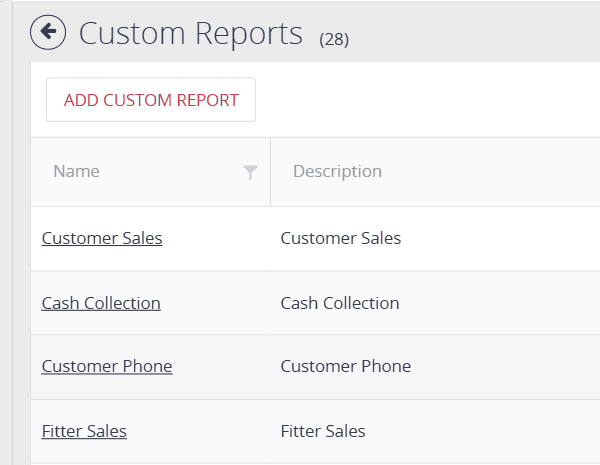
Create custom reports tailored to your specific needs, with flexible date ranges, field selection, and formatting options to ensure your exported data is always ready for use.

Key Data Exporting Features
Tools designed to give you access to your data for custom analysis, reporting, and integration

Export Any Data
Pull job data, invoices and stock reports off the portal in flexible formats, ready for use in any third-party tool or report.

Scheduled Automated Exports
Set up recurring exports that run and deliver automatically, keeping your downstream systems and stakeholders updated without manual effort.
Accounting Integration
With built in support for various accounting software such as Sage, Xero, QuickBooks and more, export your financial data in the format required by your accounting platform.
Learn About Data Exporting
See how Jobs On The Move can streamline your entire operation.
Learn About Data Exporting