Job Scheduling
Our Job Scheduling planner lets you efficiently plan, assign, and track all jobs in your field operations, ensuring maximum productivity and minimal errors.


Smart, Efficient Job Scheduling
Plan, assign, and manage every job with complete clarity
Scheduling field work shouldn’t be chaotic. With our Job Scheduling system, your office team can easily create jobs, assign them to the right teams and workers, and track progress from start to finish - all in one place.
Jobs flow seamlessly from the web portal directly to your teams tablets. They receive clear instructions and directions, complete the job on-site, and send everything back for checking and approval. Meanwhile, your team can monitor statuses, adjust plans, and manage future workloads with ease.
How We Can Streamline Your Workflow with Job Scheduling
From job creation to completion, every step is connected
Quick Job Creation
Create and assign jobs in seconds with auto-fill options for recurring tasks and repeat customers. Set the mode of payment simply and automate account customers billing with ease.

Smart Assignment
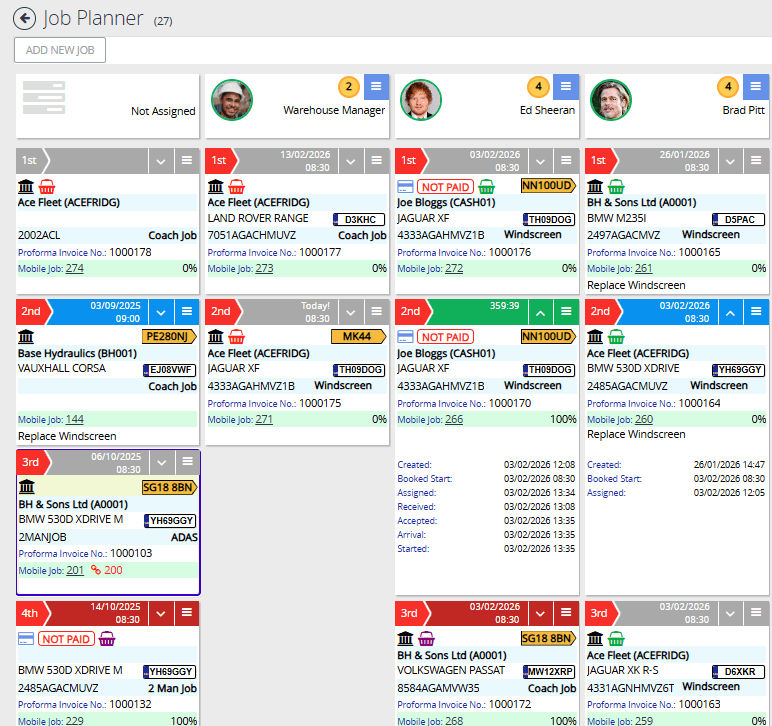
Efficiently assign jobs to team members with a simple drag-and-drop interface, making scheduling quick and intuitive. Change Job assignments quickly when plans change and staff availabilities shift.

Real-Time Updates
Get instant notifications when jobs are started, completed, or need attention via the portal. and teams in the field get instant live updates when jobs are added, changed, or removed from their schedule, keeping everyone in sync.

Planner Integration
View all scheduled and active jobs in an intuitive job planner view with drag-and-drop rescheduling. Plan ahead with a clear visual overview of your team's workload and availability, making it easy to optimize schedules and resources.
Conflict Prevention
Avoid human error and scheduling conflicts with automated job locking while active and conflict detection. Alerts notify you of potential issues during actions, ensuring smooth operations and happy customers.

Performance Analytics
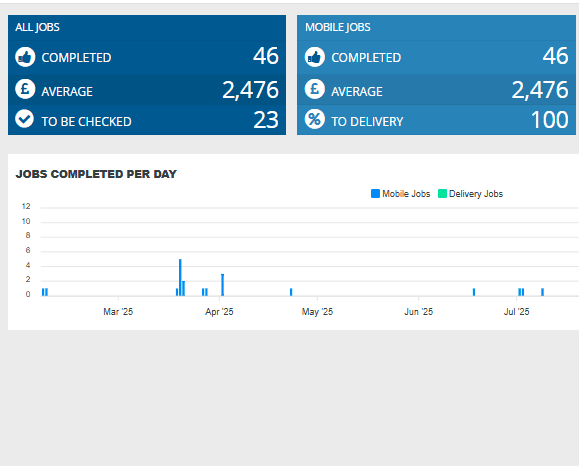
Track completion rates, Job completion times, and team productivity metrics. Use this data to optimize scheduling, identify bottlenecks, and improve overall efficiency in your field operations.

Key Job Scheduling Features
Tools designed to simplify planning, communication, and job completion

Simple Assignment
Assign jobs to team members with a single click and view real-time status updates. Update jobs and switch teams on the fly when plans change.

Live Progress Tracking
Monitor job progress as it happens with live updates pushed between the portal and field teams, ensuring teams stay on schedule.
Conflict-Free Scheduling
Avoid double-booking and manage resources and stock efficiently with our smart scheduler and Stock Management System.
See Job Scheduling in Action
See how Jobs On The Move can streamline your entire operation.
See Job Scheduling in Action